

The PCIe Backbone Behind the Magic
By Prathamesh Gujar

The reflection of water ripples dances softly across a sun-warmed wall beside the flowing river, shifting with every gentle current. Nearby, the grass bends and sways as a quiet gust moves through it, rippling like a living surface—carrying with it the faint rustle of leaves and the cool scent of water in the air. In that moment, everything feels unhurried, as if nature itself is breathing—effortless, real, and deeply peaceful.
Now imagine recreating that same subtle motion in a virtual world. Every blade reacting to invisible forces, every shadow shifting correctly, every reflection behaving just as it would in reality. This is the promise of modern graphics powered by technologies like RTX.
But here’s the part we rarely think about: before any of that realism appears on your screen, before a single ray is traced or a frame is rendered, an enormous amount of data has to reach the GPU for computing – textures, geometry, commands – all delivered at incredibly high speeds.
This is where PCI Express (PCIe) quietly does its job.
Often overlooked, PCIe is the high-speed link that feeds the GPU everything it needs to create those lifelike moments. It doesn’t render the scene, it doesn’t simulate light – but without it, the GPU has nothing to work with.
In this blog, we’ll move beyond specifications and explore PCIe the way it actually exists in real systems – through the lens of how RTX GPUs are fed, driven, and ultimately enabled to do what they do best.
From Scene to Silicon: How Data Actually Reaches the GPU
To understand where PCIe fits in, we need to pause the story at a very specific moment—the instant before the GPU begins rendering.
At this point, the scene is no longer an idea. It has already been broken down by the CPU into something the GPU can understand: buffers, textures, shaders, and a sequence of commands describing what needs to be drawn and how.
But none of this lives inside the GPU yet.
The System View
Inside a modern system, the CPU and GPU operate with separate memory spaces. The CPU works with system memory (RAM), while the GPU relies on its own high-speed VRAM. Bridging these two worlds is PCI Express (PCIe), a high-bandwidth, packet-based interconnect that acts as the only pathway for data and commands to move from host to device.
Think of this as a staged pipeline:
- The CPU prepares the scene
- Data is organized into GPU-friendly formats
- Commands are recorded into command buffers
- Everything is transferred over PCIe into GPU memory
Only after this pipeline is complete does the GPU begin execution.
What Actually Moves Over PCIe?
PCIe does not see “frames” or “graphics.” It deals in transactions – structured packets carrying raw data. In the context of an RTX workload, three major categories dominate this traffic:
- Resource Data: Textures, vertex buffers, index buffers – essentially the raw ingredients of the scene.
- Command Streams: Encoded instructions that tell the GPU what to execute: draw calls, dispatches, and increasingly, ray tracing workloads.
- Control and Synchronization: Signals that coordinate when the GPU should start, wait, or report completion.
From a protocol perspective, all of this is broken into Transaction Layer Packets (TLPs), scheduled, transmitted, and reassembled on the GPU side.
Enter PCIe: The Pathway
Up to this point, we’ve treated PCIe as a single “link” between the CPU and GPU. In reality, it’s a small network—structured, hierarchical, and designed to scale.
At the centre of this structure are three key building blocks:
- Root Port (RP)
- Switch (optional, but common in complex systems)
- Endpoint (EP)
Understanding these is the first step toward seeing PCIe not just as a bus, but as an interconnect fabric.
The Topology: Who Talks to Whom?
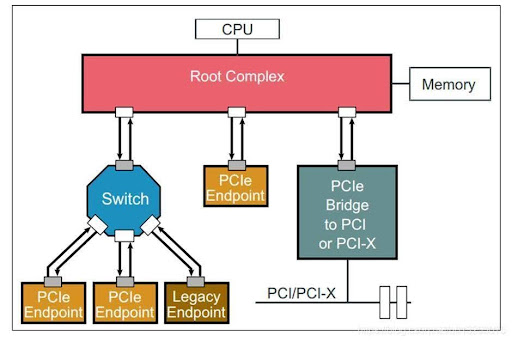
Figure 1 : PCIe Topology
Root Port (RP) — The Host’s Gateway
The Root Port sits inside the CPU (or chipset) and acts as the origin of all PCIe communication.
It is responsible for:
- Initiating transactions
- Enumerating devices during boot
- Managing configuration space access
In our running example, the CPU uses the Root Port to:
- Discover the GPU
- Allocate memory regions for it
- Begin sending command and data traffic
If you think in SoC terms, the RP behaves like a host master interface—it drives the system.
Endpoint (EP) — The Device (GPU)
At the other end sits the Endpoint—the GPU from NVIDIA.
The Endpoint:
- Receives transactions from the Root Port
- Exposes configuration space (BARs, capabilities)
- Processes incoming data and commands
Once enumeration is complete, the GPU is no longer just “a device”—it becomes a memory-mapped participant in the system. The CPU can write to it, configure it, and feed it workloads.
Switch — Scaling the System
In simpler systems, the Root Port connects directly to a single Endpoint. But in larger systems (servers, multi-GPU setups), PCIe introduces switches.
A switch:
● Connects one upstream port (toward the RP)
● Fans out into multiple downstream ports (toward endpoints)
● Routes packets based on address
It behaves somewhat like a network switch:
● It does not originate traffic
● It forwards it intelligently
This allows multiple devices—GPUs, SSDs, NICs—to share the same root complex without interfering with each other.
Bringing It Together, the path we loosely called “CPU → GPU” is actually:
CPU → Root Port → (optional Switch) → Endpoint (GPU)
Every command buffer, every texture, every control signal travels along this structured path.
But this still leaves a deeper question unanswered:
How does PCIe reliably move this data at such high speeds?
To answer that, we need to look inside the protocol itself.
Inside PCIe: The Layered Architecture
PCIe is not a monolithic protocol. It is built as a three-layer architecture, each responsible for a distinct part of the communication.
This separation is what allows PCIe to scale across generations while maintaining compatibility.
1. Transaction Layer — The “What”
At the top sits the Transaction Layer. This is where meaning exists.
It defines:
- Memory reads and writes
- Configuration accesses
- Completion responses
All high-level operations—like:
- Writing a texture to GPU memory
- Sending a command buffer
are expressed here as Transaction Layer Packets (TLPs).
This is the layer you interact with conceptually when thinking about:
“The CPU is sending data to the GPU”
2. Data Link Layer — The “Reliability”
Below it lies the Data Link Layer.
Its job is to ensure:
- Packets arrive correctly
- Errors are detected and corrected
- Lost packets are retransmitted
It does this using:
- Sequence numbers
- ACK/NAK mechanisms
- CRC checks
From a verification perspective, this is where link-level correctness is enforced.
Even if the physical medium is imperfect, this layer guarantees that the Transaction Layer sees clean, ordered data.
3. Physical Layer — The “How”
At the bottom is the Physical Layer. This is where bits meet wires.
It handles:
- Serialization and deserialization
- Electrical signalling
- Lane management (x1, x4, x8, x16)
- Speed negotiation (Gen1 → Gen5 and beyond)
When we talk about bandwidth—like “PCIe x16”—we are really talking about the capabilities of this layer.
Connecting Back to the Flow
Now, when the CPU sends a command to the GPU:
- The Transaction Layer creates a TLP (e.g., memory write)
- The Data Link Layer wraps it with reliability mechanisms
- The Physical Layer transmits it across lanes
At the GPU side, the process is reversed—until the command finally reaches the execution engines inside the GPU.
Why This Matters
At a glance, PCIe might seem like plumbing. But this layered design is precisely what enables:
● High throughput without sacrificing reliability
● Scalability across devices and generations
● Clean separation between what is sent and how it is delivered
And most importantly, it ensures that when the GPU finally begins its work, it does so with the right data, at the right time, and in the right order.
Because in the end, even the most advanced rendering pipeline depends on something far more fundamental:
A system that can deliver data exactly where it needs to be—without fail.
So far, we’ve treated PCIe as a reliable pipeline. But what actually flows through it?
In the next part, we’ll break open a PCIe transaction and see exactly how a GPU receives data.
